Understand Whether Your Website Is User-Friendly: 7 UX Pillars
Blogs, Development
July 10, 2025
SHARE:
User Experience, commonly referred to as UX, is a very broad term, which makes it hard to evaluate whether your website works with users.
As such, Peter Morville simplified UX into 7 core pillars, allowing a comprehensive evaluation of the UX:
Useful: It should have features that help users achieve certain goals easily.
Desirable: It should have add-on features that can cater to users’ specific wants.
Accessible: It should be usable by users with disabilities, and it is equally easy to use on mobile devices and laptops/PC.
Credible: It should be smooth, and there should not be any major bugs that disrupt the user experience.
Findable: It should showcase information clearly, allowing for easy navigation across the website.
Usable: As simple as it sounds, users should be able to use the website intuitively; the User Interface should be familiar.
Valuable: It should bring value to the user; it should help them save in some way, whether it is time, money, or effort. Simply, what do they gain by using your website (over going in-store, for example)?
Why Asian Hustle Solutions?
At AHS, we specialize in helping brands capture attention and inspire action — whether you’re launching a new product or scaling your business, we’ll guide you to marketing that resonates and delivers results.
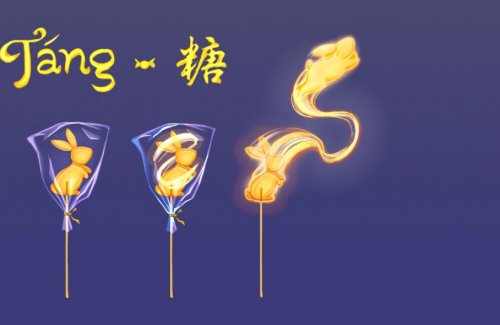
After transitioning from her career as a teacher to an animation artist and illustrator, the talented Eunice Chen once again decided to test her abilities by creating an animated short film project called Táng (糖).
“人算不如天算” — in Chinese belief, every encounter is predestined and our current state is the fruit of past karma. One life ago, we were somehow, unknowingly, cultivating our karmic connections, which ultimately led to this present life’s encounters or coincidences.
Táng is a movie about one of those by-chance encounters as well that integrates the art of 糖画 (tánghuà). Through the lens of tánghuà – a traditional Chinese sugar-painting art, this unexpected relationship arrives and flourishes into a confounding yet paramount work of fatherhood, family, and fate.
THE INSPIRATION BEHIND TÁNG
Growing up between the U.S. and Taiwan, Eunice developed deep-rooted cultural memories that shaped her appreciation for her heritage. In this new venture, she continues exploring culture—this time, through nostalgia.
Where should we begin? Back to her childhood in Taiwan, like every other child, Eunice loved going out and visiting open-air markets. Bustling lines of food vendors, jittery echoes of chatters, and also a rare occasion when one can play games without their parents’ side eyes, open markets are the idols of many young children in Taiwan. It is also where she was introduced to the art of sugar-painting.
Reflecting on this memory, Eunice shares:
Yes, the idea of this story first came from my childhood memories of visiting open-air markets and night markets in Taiwan. Whenever I visited those markets, I would always make sure to visit the candy stalls, where master candy makers sculpted these lollipops that were amazing pieces of art and also very tasty confections. And I’ve always had a giant sweet tooth, so I started my film out of a place of joy.
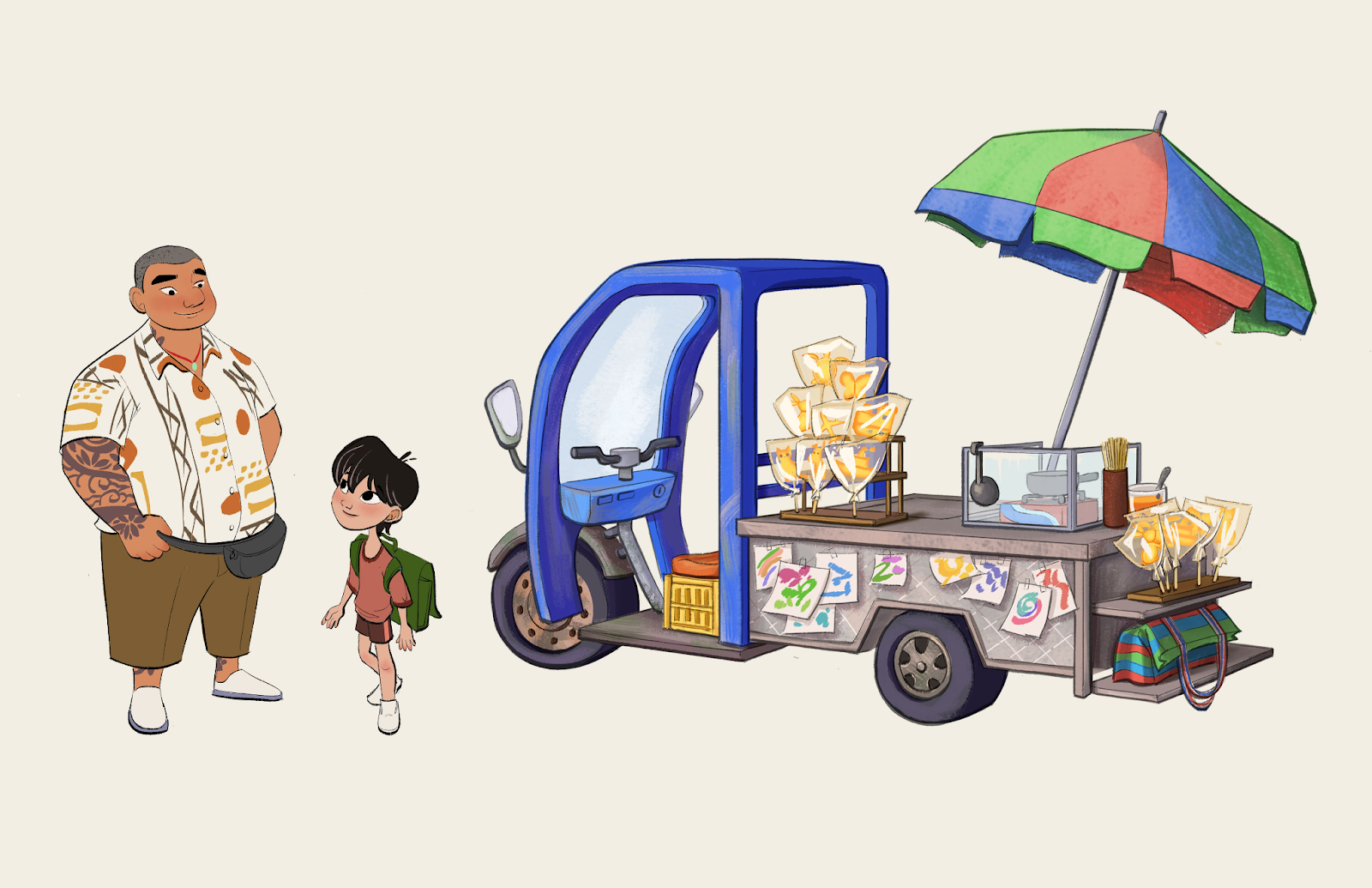
The short film centers around the meaningful connection between a sugar-painting street vendor (left) and a student.
A REFRESHING TAKE ON FATHERHOOD AND FAMILY
In Chinese families, “血浓于水” (Blood is thicker than water) has long been a staple for centuries—that family is of utmost importance, and the bloodbound places more value than strangers. It is only natural that the concept of a “chosen family” may irk some, who put a sense of filial piety and duty in high regard.
Of course, it feels almost peculiar for Eunice Chen – the eldest child, who has switched careers, from landing a “safe” job at teaching to taking a more off-the-beaten-path direction towards doll-making and now…animation artist and now…film director!! So expect the unexpected layers and nuances Eunice has painted Táng. Táng is more than just a love letter to Taiwanese night markets. It’s one that Eunice picks up the lack of positive portrayals of father-and-son relationships in the Asian community.
“When someone makes art or a film, sometimes they are painting a world they wish they had or would like to see in the future. I wish I had seen more strong bonds between Asian fathers and sons as I grew up,” Eunice shares.
While Táng’s messaging can cover this complex matter only to a certain extent; here, Eunice is after something more personal for many Asians: “a healing balm” for those with similar experiences. However, Eunice adds that she’s been seeing a lot of change in parenting recently. She says, “I am super proud of how intentional and hands-on Asian fathers from my generation (and beyond) have been with their children!”
Now, Eunice is bringing Táng to life, but she needs our support.
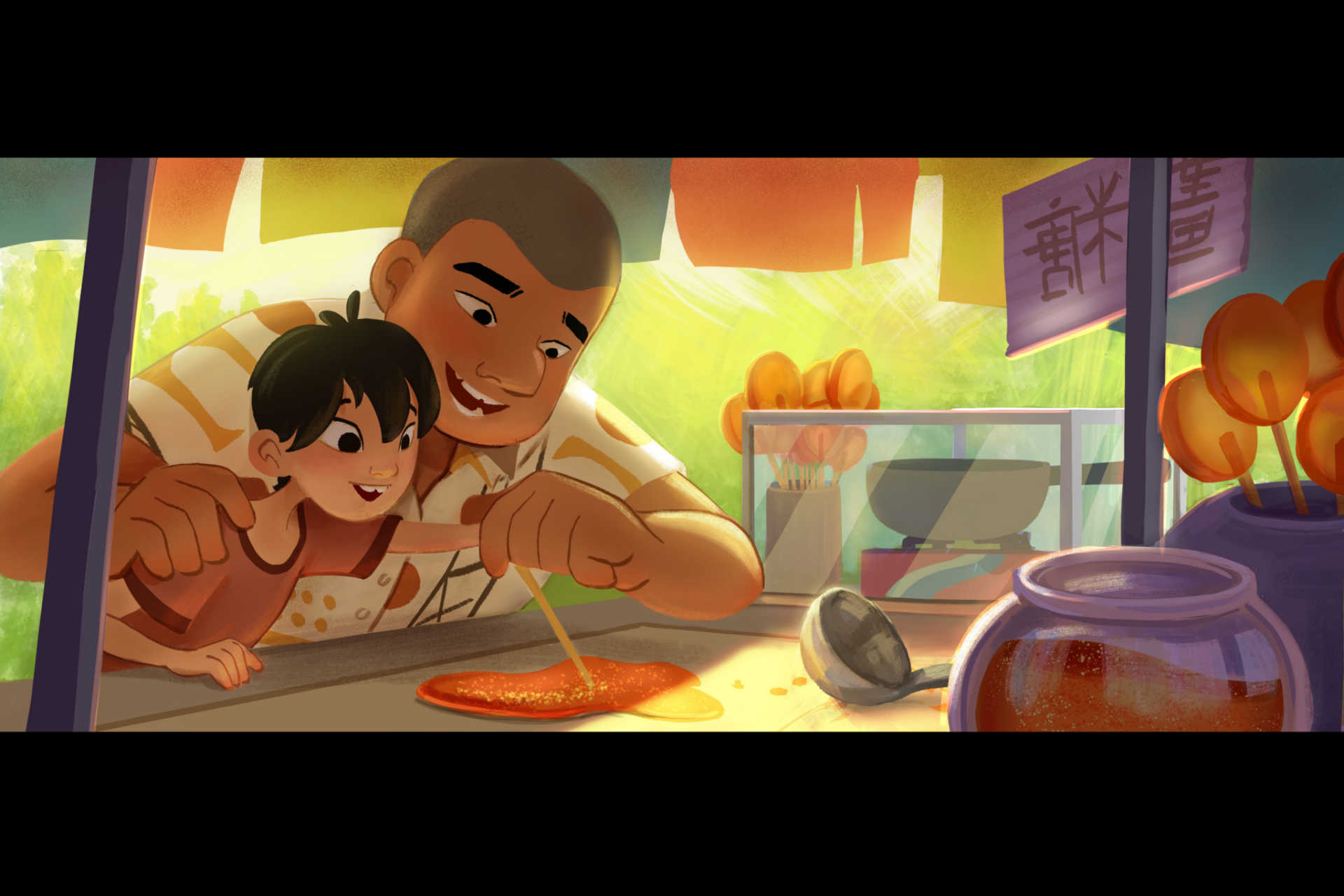
A scene involving the art of sugar-painting.
JOIN THE JOURNEY: SUPPORT TÁNG
The idea for Táng came to Eunice during a storyboarding class, when asked to create quick story concepts. Táng was one of the ideas she came up with, leading her to develop a script—her first ever. While world-building and character design might be her forte, the real challenge followed: securing funding. Facing multiple rejections, it took one “yes” from what she thought would be her final meeting to reignite her determination.
The initial funding allowed her to assemble a small but passionate team, who have since created the film’s first three minutes. Now, they need additional support to complete the project, leading to the launch of their Kickstarter campaign.
But independent films—especially ones that bring forward Asian heritage and underrepresented narratives—need tremendous community support.
Supporting the Táng crowdfunding campaign is a step forward to preserving a piece of cultural heritage while amplifying nuanced Asian fatherhood stories, and ensuring that art like this can continue to thrive.
“Keep working on your art and portfolio. Get to know people already working in the industry and learn from them. And make art that comes from the heart and makes you happy. It’s going to be very difficult, especially given the current state of things in the animation industry as a whole, but if this is truly what you want, then don’t give up!”
Love, Bonito and Asian American Girl Club have joined forces to launch the TrailBlazer Collaboration—a tribute to Asian American women breaking barriers, redefining leadership, and inspiring future generations. This campaign celebrates five extraordinary women, each donning a unique limited-edition Love, Bonito x Asian American Girl Club blazer that serves as a true reflection of their confidence, resilience, and identity.
Meet the Trailblazers:
Ally Maki – Actress, Advocate, and Founder of Asian American Girl Club, Ally embodies power and purpose in the RuchedReady® Rachel Blazer—made for the woman who rolls up her sleeves and gets things done
Sherry Cola – Comedian, Actress, and Storyteller, Sherry embodies authenticity in the Alya Boxy Crop Blazer, a reflection of her bold humor and vibrant energy.
Amanda Nguyen – Astronaut and Founder of Rise, Amanda exudes resilience and advocacy in the RuchedReady® Lapelles Soft Blazer, a symbol of strength and justice.
Michelle Kwan – Olympic Figure Skater and Diplomat, Michelle showcases her grace and determination in the RuchedReady® Classic Regular Fit Blazer, a nod to her unwavering spirit both on and off the ice.
Paravi – Popstar and Actress, Paravi brings her dreamy vibes and fearless creativity to the RuchedReady® Aera Slim Blazer—because bold artistry deserves a bold fit.
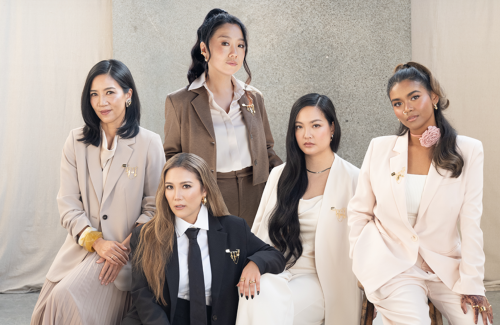
The Trailblazers (from left to right): Michelle Kwan, Ally Maki, Sherry Cola, Amanda Nguyen, Paravi
A Mission-Driven Collaboration
“At Love, Bonito, we share a common mission with Asian American Girl Club—to champion and uplift Asian American women in spaces where they have long been underrepresented,” said Dione Song, CEO of Love, Bonito. “This Trailblazers collaboration is a tribute to the trailblazers shaping industries, breaking barriers, and inspiring communities worldwide.”
A Pin with Purpose
Every detail in this collection carries a deeper meaning. Each blazer from the collaboration comes with a custom pin set representing a trailblazer’s journey:
The Phoenix – A symbol of resilience and rebirth, reminding women of their power to rise after every challenge.
The Sakura – Representing renewal and growth, celebrating transformation and new beginnings.
The Ginkgo – A timeless emblem of endurance and strength, honoring those who stand firm in adversity.
Now More Than Ever
“Asian American women have always driven powerful change, though our stories have often gone untold,” said Ally Maki, Founder of Asian American Girl Club. “Through Trailblazers, we’re affirming that our impact and leadership across all industries has always been—and will continue to be—undeniable.”
Love, Bonito is the leading female-founded fashion brand in Southeast Asia, dedicated to empowering women through thoughtful, versatile designs. With a deep understanding of the modern woman’s needs, Love, Bonito creates timeless and functional pieces that blend style with confidence. More than just a fashion brand, Love, Bonito is committed to fostering a strong, supportive community—championing women in every stage of their journey through representation, storytelling, and purpose-driven initiatives.
About Asian American Girl Club:
Asian American Girl Club (AAGC) is a cultural force and community-driven brand dedicated to amplifying the voices and experiences of Asian and Asian American women. Founded by actress Ally Maki, AAGC creates space for connection and representation through fashion, media, and storytelling. With a mission to break stereotypes and celebrate identity, AAGC is more than a brand—it’s a movement empowering the next generation to be seen, heard, and unapologetically themselves.
While Trump claims tariffs will significantly impact the countries they target, experts argue that consumers and businesses will bear the brunt of the consequences.
Research by The Budget Lab at Yale University estimates that price levels may rise to 2% this year, equivalent to $3,000 per average household. Another report from D.C. stated that the new tariffs on China affect about 14% of U.S. imports and may raise costs to $25 billion annually. As the tariff war escalates, everyday consumers will face even higher prices.
Asian American communities and businesses are particularly vulnerable. In New York’s Chinatown, 28% of residents already live below the poverty line. With many companies relying on imports from Asia, owners are uncertain about their survival.
Mott Street in Manhattan’s Chinatown (Image source: NBC News)
“Here in Chinatown, especially, we have many elderly residents on fixed incomes,” says Edward Lau, owner of a traditional medicine shop in San Francisco’s Chinatown. With 90% of his stock sourced from Hong Kong and China, he worries, “If it gets very expensive, their spending power will be lower. Chinese immigrants will ultimately be harmed the most.”
Taylor Chow, owner of American Tai Wah Trading Corp, adds, “The Chinese community in Chinatown has been hit hard most because we consume a lot of imported ingredients. A lot of products only come from China. Even if manufacturers try to move their production line to Vietnam, to Malaysia, to Singapore, it’s not that easy.”
Supply chain disruptions and rising costs are straining small Asian American businesses. Since the community depends on these shops for cultural goods, they, too, will feel the pressure.
Mei Lum, owner of Lum’s Store, the longest-operating business in Manhattan’s Chinatown, explains, “Our working-class community here in Chinatown is definitely, in these circumstances, always being hit the hardest. And a lot of them have told me that their solution to mitigating these circumstances has been to eat those costs and only raise those prices by a smidgen, just to make sure they’re affordable for the people that frequent their establishments. How long can they sustain that?”
Mandy Lau helping a customer pick ginseng (Image Source: The Chronicle)
The erosion of these businesses could lead to cultural loss, impacting food, traditions, and ceremonial products. Lucas Li, whose family runs Lion Trading in San Francisco, specializing in feng shui and spiritual supplies, says, “When they get expensive, it makes it harder for Chinese people, for their families to maintain those traditions and do it at the proper steps. When customers shop at local businesses and small businesses, they’re not just buying a product, they’re basically investing in the community, supporting families, and protecting our traditions.”
Large online retailers like Shein, Temu, and AliExpress are also affected. While it is unclear how much product prices will rise on these e-commerce platforms, experts predict delivery delays and price hikes due to tariffs. Youssef Squali, an analyst at Truist Financial, notes, “The vast majority of these orders are valued less than $800, which means all or virtually all of them are going to get caught in that.”
Ultimately, Asian Americans may feel the greatest impact. As Linda Chao, a resident of Oceanview, states, “When there are tariffs, it won’t fall on China, it’ll fall on us. It can’t be helped. I also don’t have time to go and protest. I feel there’s nothing we can do.”
As AI increasingly makes its way into the UI designer’s toolkit, Midjourney is fast becoming one of the most popular image generators.
With a simple text prompt, you can use Midjourney AI to create custom digital artworks, whip up an app screen, design individual UI elements, and generate colour palettes—all in a matter of seconds.
For UI designers, this can really accelerate the ideation process and help you expand your own creativity.
So how does Midjourney AI work? And how can you leverage it in the UI design process? Let’s take a look.
What is Midjourney AI and how does it work?
Midjourney is a generative AI tool created by Midjourney, Inc.—an independent research lab based in San Francisco.
Midjourney AI generates images and digital artworks based on text prompts. If you enter a prompt asking for an image of a mermaid swimming underwater surrounded by marine life, Midjourney will generate four versions for you to choose from. The more specific your prompts, the better—but we’ll get to the art of prompt-writing for Midjourney in a later section.
Midjourney works within the Discord platform. Discord is an instant messaging app, commonly used to create communities where users can chat via text, voice, and video. Discord essentially facilitates communication between the user and the Midjourney bot.
Midjourney uses two key machine learning technologies:
Large Language Models (LLM): this is how Midjourney understands and interprets the text prompts provided by the user.
Diffusion Models (DM): in very simple terms, this technology converts random visual noise into a meaningful image. You enter a text prompt, which sparks a field of visual noise. The AI then progressively removes that noise in incremental steps, eventually resulting in an image that resembles what you’ve asked for.
Now we know what Midjourney is and how it works, let’s drill down to some key functions and features.
What can Midjourney AI do? Key features
Midjourney’s core function is to convert text prompts into images. This allows you to generate unique digital artworks and graphics in a range of styles.
You can guide the image generation process by applying custom parameters to your prompts. You might specify a certain aspect ratio, for example, or a particular style such as ‘watercolour’ or ‘flat design’.
You can also customise the quality of your images by specifying, within your prompt, a value for the rendering quality. You might specify ‘q 1’ (that’s the default quality level) or request that images be rendered to a higher quality by specifying ‘q 2’ in your prompt.
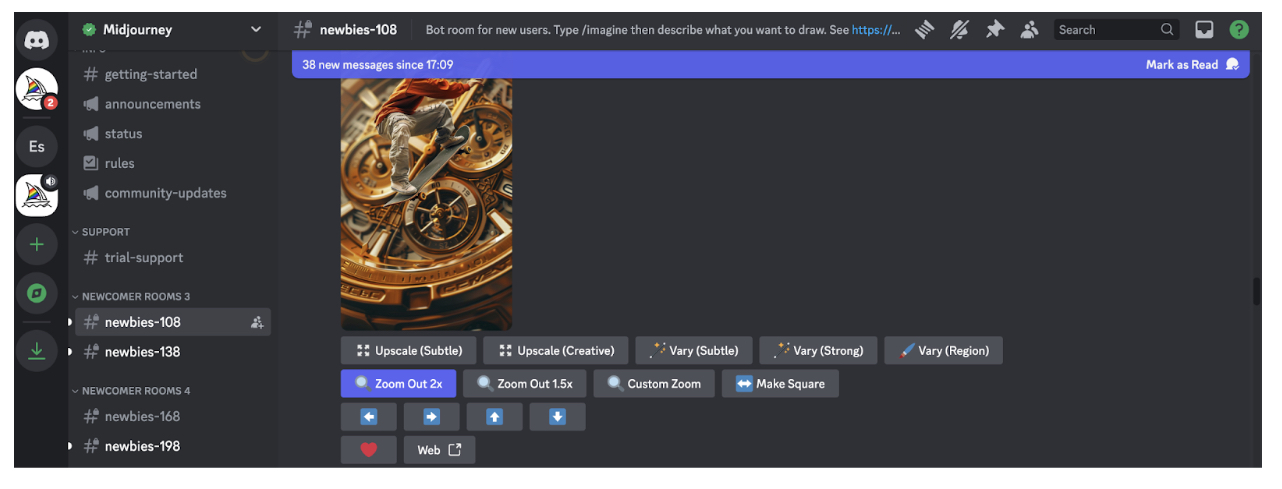
Once you’ve entered your prompt, Midjourney will give you four different image versions. You can choose to upscale a particular version, which will increase the size/dimensions of the image and also improve the quality.
Beyond image generation, Midjourney serves as a great source of community and inspiration. You can share your creations and browse images created by others, allowing you to see what’s possible with Midjourney and sparking ideas for your own work.
How to get set up on Midjourney AI
To use Midjourney AI, you’ll need to create both a Discord account and a Midjourney account.
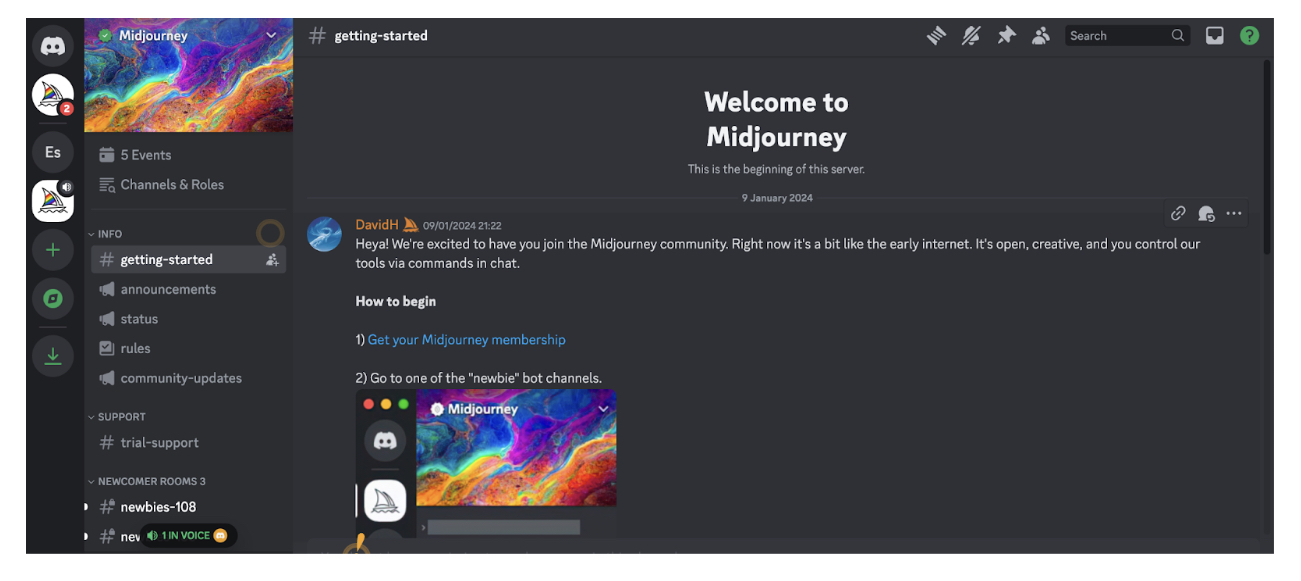
If you’re not already a member, first head over to the Discord platform and follow the instructions to create your account. Once you’re signed up, join the official Midjourney Discord server by clicking the ‘Accept invite’ button.
You’ll then find yourself in the “Getting started” channel, where you can create your Midjourney account (if you haven’t already done so) by clicking “Get your Midjourney membership” (visible in the chat):
This will take you to a separate page, the Midjourney showcase, where you can click “Sign up” in the bottom left corner to create your Midjourney account.
Once you’re signed up and logged in to Midjourney, you can navigate back to the Midjourney Discord server and enter one of the so-called “newbie” bot channels. You’ll find available newbie channels on the left-hand side.
You can then enter your own prompts into the chat box to start generating images.
At the time of writing, Midjourney is no longer offering a free trial for new users. If you want to start prompting, you’ll need to sign up for a paid subscription.
How much does Midjourney AI cost?
Midjourney offers four price tiers:
Basic Plan for $10 per month or $96 per year with an annual subscription (that’s around €9 per month / €89 per year)
Standard Plan for $30 per month or $288 per year with an annual subscription (that’s around €28 per month / €267 per year)
Pro Plan for $60 per month or $576 per year with an annual subscription (that’s around €55 per month / €533 per year)
Mega Plan for $120 per month or $1,152 per year with an annual subscription (that’s around €111 per month / €1,066 per year).
For more information about each price tier and what’s included, visit the official Midjourney pricing page.
How to use Midjourney AI in UI design (with example prompts)
Midjourney can generate custom visuals in a matter of seconds—making it an incredibly interesting tool for UI designers. You can use Midjourney to quickly create screens and individual UI components, come up with themes, styles, and colour palettes, and generate unique digital artwork.
Note, however, that the graphics you create with Midjourney won’t necessarily be directly usable—and working with Midjourney doesn’t eliminate the need to create your own screens and elements using the usual UI tools like Sketch and Figma. If you generate an app screen with Midjourney, for example, you’ll still need to actually create that screen from scratch yourself.
Where Midjourney really comes in useful is helping you to explore different ideas and concepts and gather inspiration. You might use your AI-generated artwork to inspire mood boards, kick-start an ideation session, or serve as a guide for certain layouts or colour schemes.
With that, let’s consider some examples of how to use Midjourney for UI design.
Use Midjourney AI to generate app screens
If you’re designing for mobile, Midjourney can help you ideate layouts and designs for various app screens. If you’re designing a dating app, for example, you might try the following Midjourney prompts:
/imagine a vibrant and fun login screen for a dating app, with an eye-catching background, username and password fields, and buttons for login and social media sign-ins
/imagine a user profile screen for a dating app, featuring a large profile picture at the top, user bio, interests, and match percentage displayed in a clean layout
/imagine a match screen for a dating app, showing potential matches with profile pictures, a brief bio, and buttons to like, dislike, or super like
/imagine a chat screen for a dating app with a clean interface, message bubbles, timestamps, and an input field at the bottom
Create UI components such as icons, buttons, and logos
Perhaps you want inspiration for the finer details of your app or website. In that case, try using Midjourney AI to create individual UI components such as icons, buttons, and logos. Here are some prompt examples to guide you:
/imagine a set of modern buttons for a mobile app, including primary, secondary, and disabled states, using a black and white colour scheme
/imagine a collection of minimalist icons for a mobile app, including icons for home, search, messages, settings, and notifications
/imagine a sleek and modern logo for a dating app, incorporating elements of connection and love, with a vibrant colour scheme
Generate theme and style concepts
In the early stages of the design process, you might focus on coming up with an overall visual style for your website or app—and Midjourney can help with this, too. Specify your vision or initial ideas and let Midjourney bring them to life.
Consider the following prompt examples:
/imagine a light mode theme for a productivity app, featuring white backgrounds, soft grey UI elements, and navy blue highlights
/imagine a dark mode theme for a music app, with black backgrounds, dark grey UI elements, and neon pink highlights
/imagine a vibrant and colourful theme for a creative design app, with bold colours like orange, pink, and teal, playful typography, and dynamic UI elements
Create custom website imagery
Imagery plays an important role in UI design, helping to reinforce brand identity and enhance the visual appeal of your website or app.
Whether you want to create cartoon-style illustrations, abstract artwork, or realistic images of products, places, or people, Midjourney can generate custom imagery that reflects your brand and vision.
Here are some examples of how you might prompt Midjourney to generate images for different use cases:
/imagine a stunning hero image for a tech startup website, featuring abstract technology elements and a modern cityscape in the background
/imagine a set of custom illustrations for a health and wellness website, featuring people doing yoga, eating healthy, and meditating
/imagine a unique background image for a creative agency website, with abstract shapes and vibrant colours
Generate colour palettes
Perhaps you want help coming up with the perfect colour palette, or you’ve already got a colour scheme in mind and want to see how it looks in practice. Again, Midjourney is an excellent source of inspiration here. Simply specify the kind of look and feel you’re aiming for and Midjourney can generate multiple colour palettes accordingly.
Consider the following prompt examples to guide you:
/imagine a pastel colour palette for a wellness app, featuring soft shades of mint green, blush pink, lavender, and light grey
/imagine a bold, split-complementary colour palette for a fitness app, comprising three colours
/imagine a monochromatic colour palette for a finance app
How to write effective prompts for Midjourney AI
As with all generative AI tools, the quality of the output depends on the quality of the input. In other words, it’s up to you to tell the AI what you want—and to master the art of prompt-writing for the specific tool you’re using.
Here are some tips to help you write effective prompts for Midjourney AI:
Start each prompt with the /imagine command, followed by a description of what you want the AI to create.
Keep it simple and specific. To quote the official Midjourney guidelines for prompt-writing: “The Midjourney Bot works best with simple short phrases that describe what you want to see. Avoid long lists of requests and instructions.”
Specify what you want the image to include, rather than what you don’t want it to include. Even if you specify “no flowers” in your prompt, the AI will likely only focus on the word “flowers” and therefore create an image that does indeed contain flowers. If you absolutely want to exclude something from the image, use the “no” parameter. For example: – – no flowers.
If necessary, specify your desired aspect ratio using the following parameter: – – ar [value]. If you wanted to generate an app screen, you could specify – – ar 16:9.
Use the stylize parameter to control the level of artistic flair that Midjourney injects into each image. If you imagine that the default level, 2500, gives you a medium level of stylization, you can dial it up or down by specifying values higher or lower than 2500. If you wanted to generate an image of a garden that’s more realistic than artistic, you might specify – – stylize 500. If you wanted to create an image of a garden that looks magical and fantastical, you might specify – – stylize 3500.
Use the quality parameter to adjust the level of quality and detail in the image. – – q 1 is the default, so work from that value to dial the quality up or down.
Most importantly, be prepared to experiment. The more you use Midjourney, the more intuitive the art of prompt-writing will become. You’ll start to get a feel for what works and see how different words, phrases, and parameters influence the output.
Ethical considerations when using Midjourney AI
If you’re using Midjourney AI (or indeed any AI tools) throughout the design process, you must take care to use it responsibly. Here are some of the most important ethical considerations to bear in mind.
Intellectual property and copyright
When generating images with AI, be careful about replicating existing images or artworks created by other artists or designers. You might use a famous logo for inspiration, for example, but you wouldn’t want to emulate the style too closely to the point of copying.
Deceptive and misleading content
This is like the visual equivalent of fake news—creating image-based content that deliberately deceives, misleads, manipulates, or spreads misinformation. Don’t do it!
Stereotypes and bias
It’s well-documented that AI can and does perpetuate harmful stereotypes and biases. As a human user, you must be diligent about actively looking out for such biases and taking steps to mitigate them.
Strive to generate images that are inclusive and representative of diverse groups. If you generate an image that doesn’t feel inclusive or could potentially exclude or harm certain people, don’t use it. You can learn more about the importance of designing inclusive content in this guide.
As a general rule: always review AI-generated content with a critical eye, and use your better judgement. As a human user, it’s your responsibility to consider the impact of any content you create—and to ultimately decide what makes it into the public domain.
The takeaway
Midjourney AI can generate custom images in seconds, making it an excellent tool for gathering inspiration, sparking your own creativity, and ideating and exploring different design concepts, layouts, and styles.
Whether you use it to generate fully-fledged app screens, individual UI elements, impressive artworks, or colour palettes: Midjourney AI is a powerful addition to your UI design toolkit.
Ready to get started with Midjourney AI? Experiment with different prompts and use cases, explore other Midjourney users’ creations, and be mindful of the ethical considerations we’ve laid out in this guide. You’ll soon be generating images like a pro!