Search Intent: The Overlooked SEO Metric That Beats Algorithm Updates
Blogs, Development
April 23, 2025
SHARE:
Before choosing SEO keywords, you’ve likely considered high-volume terms and difficulty metrics. But to weather never-ending algorithm updates, search intent might be your golden ticket. Here’s why:
Customer Intention
The most critical factor in keyword selection—it ensures your content aligns with what customers actually need (not just what they search).
Relevance
A keyword may be popular but irrelevant to your brand. Focus on phrases that mirror your customers’ pain points and your solution.
Existing Ranking
Overlapping words can lead to cannibalization. For every new content, use fresh keyword sets to re-optimize existing assets and further align with customer needs.
Are you looking to build a new website or revamp an existing one in 2025? One of the first things to consider is the cost of web development services. The price can vary greatly depending on several factors, from the development team’s location and experience to the project’s complexity and scope. In this article, we’ll take a closer look at the average hourly rates for web development services in 2025, the factors that can affect the cost of a website project, and some tips for budgeting for ongoing maintenance and support. So, let’s dive in and find out exactly how much you can expect to pay for web development services in 2025.
The Average Hourly Rates for Web Development Services in 2025
In 2025, the average hourly rate for web development services can range anywhere from $20 to $150 per hour, depending on the development team’s location, their experience level, and the specific technologies and tools required for the project.
Ukraine, Poland, and Belarus are some of the best countries to hire offshore developers. These countries offer some of the most affordable hourly rates for web development services, ranging from $20 to $50 per hour.
In addition to the location of the development team, the specific technologies and tools required for the project can also affect the hourly rate for web development services. For example, developers with expertise in more specialized technologies such as React JS or Node JS may have a higher hourly rate than those with expertise in more standard and widely-used technologies such as PHP or HTML/CSS.
The Cost of a Website Project: Basic vs Complex
Basic websites, also known as informational websites, are typically smaller in scope and are designed to provide basic information about a company or organization, such as contact information and a list of services. These types of websites can often be built for as little as $1,000 to $5,000.
On the other hand, complex websites are typically larger in scope and may include features such as e-commerce functionality, custom databases, and advanced user interfaces. These types of websites can often cost anywhere from $5,000 to $50,000 or even higher, depending on the specific requirements and features included.
When determining the cost of a website project, it’s essential to consider the specific needs of your business and the types of features and functionality necessary for your website to succeed. While a basic website may be sufficient for some companies, others may require a more complex solution to meet their needs fully.
Savvy Strategies for Cutting Costs on Web Development in 2025
Web development can be a significant expense for any business, but there are ways to save money without compromising on quality. Here are 6 tips to help you cut costs when developing a website or application.
Have a clear plan and scope of work: Define your project’s requirements, goals, and objectives before beginning development. This will help you identify the features and functionalities that are essential to your project and avoid unnecessary costs. I recommend you write a web design brief which is a document that outlines the specifics of a website design and development project.
Use open-source software: Leverage open-source software, such as WordPress, Joomla, or Drupal, to reduce the development cost.
Outsource to a cost-effective location:Outsourcing web development to countries such as Ukraine or Poland can be cost-effective and save you money on development costs.
Use pre-designed templates and themes: Using pre-designed templates and themes can save you time and money on design costs.
Avoid customizing unnecessary features: Only customize features that are essential to your project. Customizing unnecessary features will add to development costs.
Use a project management tool: Using a project management tool to keep track of progress and timelines can save you money on development costs.
Factors That Affect the Cost of Web Development Services
Here are 8 factors that can affect the cost of web development services:
Location of the development team: The cost of living and average wages in a given location can affect the hourly rate for web development services. Generally, web development services in countries with a higher cost of living, such as the US and Europe, tend to be more expensive than those in countries with a lower cost of living.
The development team’s level of experience and expertise: Developers with more experience and expertise may charge a higher hourly rate for their services. On the other hand, full-stack web developers can spend less time on a project and provide more quality services that are essential for enterprise web projects.
Specific technologies and tools required for the project: Projects that require specialized knowledge and experience in certain programming languages or frameworks may have a higher hourly rate compared to those that use more common and widely-used technologies.
Project complexity and scope: The complexity and scope of the project can affect the amount of time and resources required to complete it, which can, in turn, affect the cost.
Design and branding: The cost of web development services can be affected by the cost of design and branding elements, such as the cost of creating a custom logo, selecting color schemes and layouts, and other visual elements that are unique to the project.
Third-party integrations: The cost of web development services can be affected by the cost of integrating third-party tools or services, such as payment gateways, analytics, and other features that are not included in the core development services.
The level of customization required: Customized solutions will require more time and resources to develop, resulting in higher costs.
The need for SEO and marketing: Implementing an SEO strategy and a marketing plan can add to the development costs. This may include optimizing website structure, content, and meta tags for search engines, building backlinks, developing an ongoing content marketing strategy to improve search engine rankings, and developing a marketing strategy to increase visibility and attract users to the website.
Budgeting for Ongoing Maintenance and Support in Web Development Services
Website maintenance is essential to keeping your online presence up to date and running smoothly. The cost of website maintenance can vary greatly depending on your website type and the level of maintenance required. In this case, we will explore the different types of websites and the corresponding maintenance costs you can expect to incur.
Basic websites: These are simple websites that typically consist of a few pages, such as a home page, about us page, and contact page. The maintenance cost for these types of websites is usually low, averaging around $30 to $50 per month.
E-commerce websites: These types of websites allow customers to purchase products or services online. The cost of maintenance for e-commerce websites is typically higher than basic brochure websites, averaging around $50 to $100 per month.
Custom websites: Custom websites are tailored to a specific business or organization and often require more complex features and functionality. The cost of maintenance for custom websites can range from $100 to $200 per month.
Content Management System (CMS) websites: CMS websites are built using platforms such as WordPress, Joomla, and Drupal. The maintenance cost for these types of websites can range from $50 to $100 per month.
Social media websites: Websites that are focused on social media interactions, such as forums and message boards, require regular updates and maintenance to keep content fresh and users engaged. The maintenance cost for these types of websites can range from $50 to $150 per month.
It is important to note that these costs are approximate and can vary depending on the specific needs of your website. Additionally, getting a quote from a website maintenance company is always recommended before committing to a contract. By understanding the different types of websites and the corresponding maintenance costs, you can make an informed decision when it comes to maintaining your online presence.
Sum up
In conclusion, the cost of web development services can vary greatly depending on several factors, including the development team’s location and experience, the project’s complexity and scope, and the specific technologies and tools required. In 2025, the average hourly rate for web development services can range anywhere from $20 to $150 per hour. Basic websites can often be built for as little as $1,000 to $5,000, while complex websites can cost anywhere from $5,000 to $50,000 or even higher.
To save money on web development costs, businesses can consider outsourcing to cost-effective locations, using open-source software and pre-designed templates and themes, and avoiding customizing unnecessary features. It is also essential to have a clear plan and scope of work before beginning development and use a project management tool to keep track of progress and timelines.
Many people know that improving the website loading speed by 0.5 sec is invisible to the users. But it’s still one of the essential search engine factors they use in their ranking algorithms. Also, many web users may use a slow Internet connection, even in the USA and Europe. That is why improving website loading speed is a high-priority task for web development teams. How to improve the website speed?
What is website speed?
Technically the term website loading speed is incorrect because it is about page loading speed.
In short, website loading speed refers to how quickly the content and UI elements of the specific page load when a user visits it.
Several factors can influence specific page speed:
The amount and size of the images and videos are contained on the page
UI animations
Themes and plugins are installed on the site
Front-end and server-side technologies are used
The code quality
Hosting or server
But you must know that the user’s Internet connection also affects the web page speed.
Start with website speed testing
You may start the website speed test with your smartphone and mobile Internet connection. Does your site load quickly enough? Does your site look mobile-friendly? This test helps you to identify critical speed issues and how responsive the design of your website is.
But using a smartphone test can’t tell about a website’s score in terms of the website loading speed. Also, it can’t help to identify the causes of slow website loading. That is why you should use tools to test and measure your website’s loading speed.
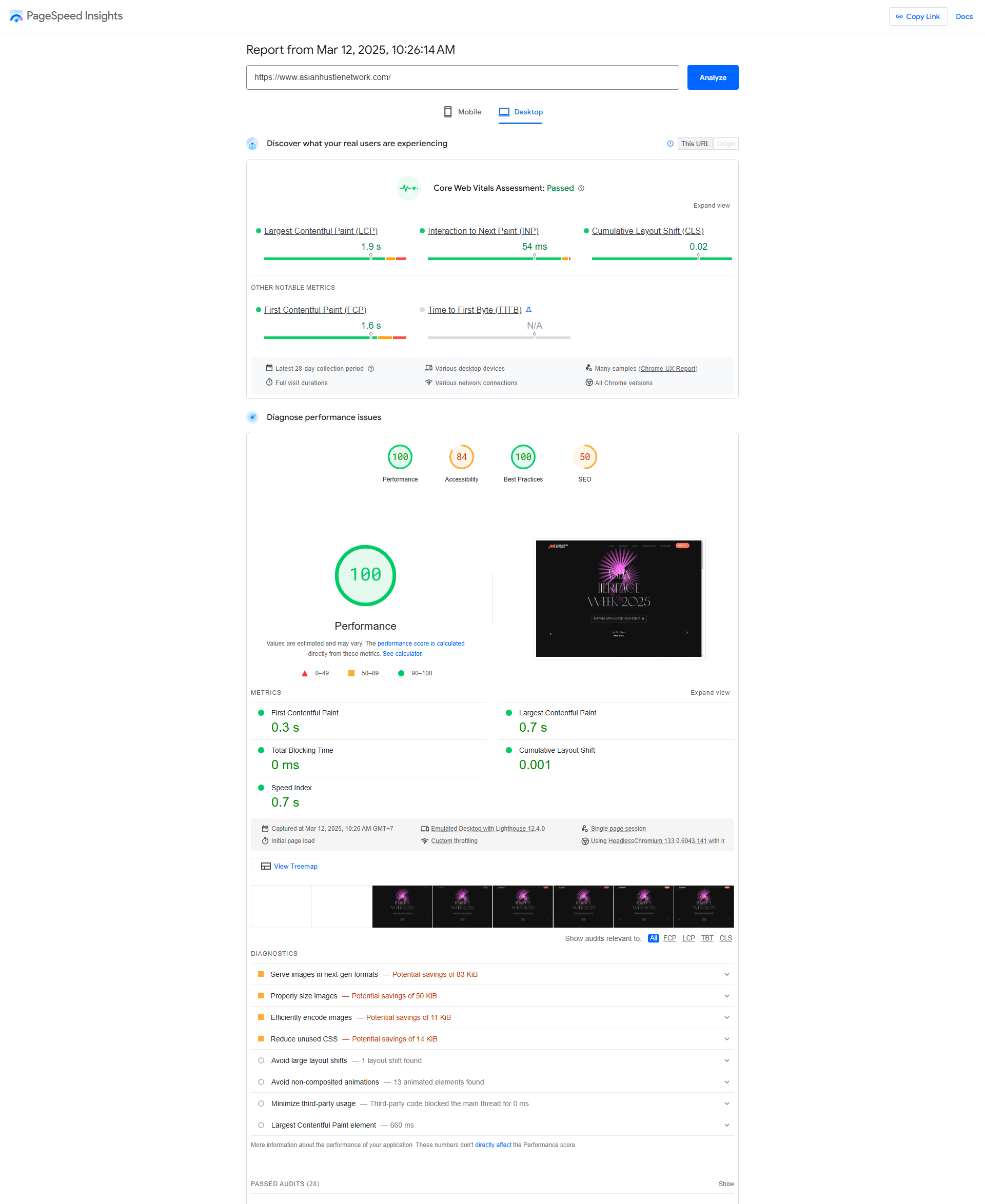
The most used tool is Google Pagespeed Insights. It is easy to use and provides you with the most critical information. Look at the snapshot for our website.
AHN’s team developed this site. You can see good scores and no critical issues that could affect the website loading speed.
If Google Pagespeed Insights identifies issues, it will provide recommendations for increasing the website’s performance.
This free tool allows testing the site’s mobile and desktop versions. You can use the Lighthouse tool that is built-in Chrome browser—Press F12 to run web developer tools and choose the Lighthouse tool to test the page.
Some tools are free, but other tools can be payable. Many web professionals use Lighthouse and Core Web Vitals reports because it is usually enough.
Guidelines to improve the website loading speed
The Lighthouse tool (Google Pagespeed Insights) assessed your site as poor (score is less than 50) or as a website that needs improvements (score from 50 to 89). A web developer must look at the tool’s recommendations and fix issues.
This guide will help you to understand which factors influence website speed and how to increase it.
Optimize the images
Surprisingly, images are one of the most common issues affecting website loading speed. The main reason is that content managers do not pay attention to the size and format of the images when uploading them to the website.
There is a typical image optimization process.
Reduce the image size.
Photos, images, or graphics on the web pages improve engagement. But if you use large files, the images slow down a website.
Compressing images using tools is one way to reduce image size without affecting quality. Another way to reduce the image size is to adjust the image size based on user display properties.
Choose the right image format.
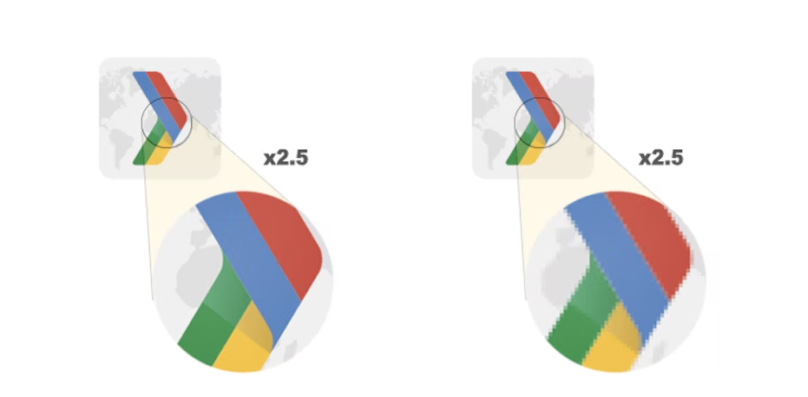
Look at this image. It shows the difference between a zoomed-in vector image L and a raster image R.
As you can see, vector images are preferable options as they are resolution-independent and always deliver excellent results.
If you use raster images, a web developer should serve different image sizes to other devices. But bear in mind that serving desktop-sized images to mobile phones can use 2–4x more data than needed.
Use WebP images
When Facebook switched to WebP, they noticed a 25-35% filesize savings for JPEGs and an 80% for PNGs.
How to convert images to WebP? Usually, web developers use the cwebp command-line tool (for simple projects) or the Imagemin WebP plugin(for complex projects).
Replace animated GIFs with video.
GIFs aren’t a good choice when you need a fast website because their size can be 10-15 MB.
It takes a lot of time to upload a GIF file. That is why web professionals convert GIFs into video files (MPEG or WebM).
Use image CDNs to optimize images.
Image content delivery networks (CDNs) specialize in transforming, optimizing, and delivering images. They are excellent at optimizing images and can yield a 40–80% savings in image file size. Image CDNs work like API, making it easy to create variations of an image for different use cases by indicating parameters like size, format, and quality.
Use lazy loading
Lazy loading is a technique that defers the loading of non-critical resources while the web page loads. In practice, the image lazy loading loads lightweight placeholder images at page load and replaces them with lazily-loaded images when they’re scrolled into the viewport.
Using lazy loading makes sense if you use many media files on your site. Web developers can use a variety of ways to implement lazy loadings, such as browser-level lazy loading, Intersection Observer (JavaScript), or CSS. If your website is built on WordPress, you can use plugins.
Use a Content Delivery Network (CDN)
Content delivery networks (CDNs) improve site performance using web servers distributed across various locations. These servers retrieve content from the website server and provide website content to users with regard to their location. CDNs reduce server load and handle traffic spikes.
Also, CDNs allow caching resources on their servers. As a result, the resources are delivered more quickly. Cashing also reduces the load on the website server.
To choose a good CDN, you should focus on its performance, security, analytics features, support, and pricing.
You need to know that CDN performance can vary significantly depending on geography, time of day, and different events. That is why predicting the exact performance you’ll get from a CDN is difficult.
Choosing a good CDN depends on the type of your site (e-commerce, corporate website, blog), user locations, and your budget.
Prioritize loading resources
Not every website resource has the same degree of importance, which is why browsers attempt to make a guess at the most important resources to load first. The problem is browsers could use the wrong priority for website resources. For example, loading scripts before CSS.
Web developers can use different ways to influence browsers’ priority-making process.
If a web developer adds the <script> tag in the page’s <head>, Chrome will load at a high priority. But using the async attribute changes it to low priority.
Also, a web developer can use <link rel=”preload”> (informs the browser that a resource should start getting fetched as soon as possible), <link rel=”preconnect”> (informs the browser that you’d like the process to start as soon as possible), and <link rel=”prefetch”> (it tries to make something non-critical happen earlier if there’s a chance) for other resources.
To make everything right, a web developer should know the browser’s priority for each resource. For example, to know Chrome’s priority, you need to press F12 to run DevTools and find the Network panel.
These priorities help to understand how much relative importance the browser attributes to resources. A web developer can influence the browser to assign a different priority. For example, if an image is a part of the initial render, a web developer prioritizes it higher than an image that starts offscreen.
Optimize CSS code
CSS code must be loaded before the browser renders the website page because it is a render-blocking resource. If these web pages contain unnecessarily large CSS code, it takes longer to render them.
There are two main techniques that web developers use.
The first is deferring non-critical CSS. Many non-critical styles apply to content that’s not immediately visible, for example, paragraphs inside the accordions. A web developer can defer this non-critical code.
The second is minifying CSS. Minification CSS files is a technique that reduces unnecessary code, comments, whitespaces, and indentation in CSS files. A professional web developer can safely remove unnecessary characters and reduce CSS file size without affecting website rendering.
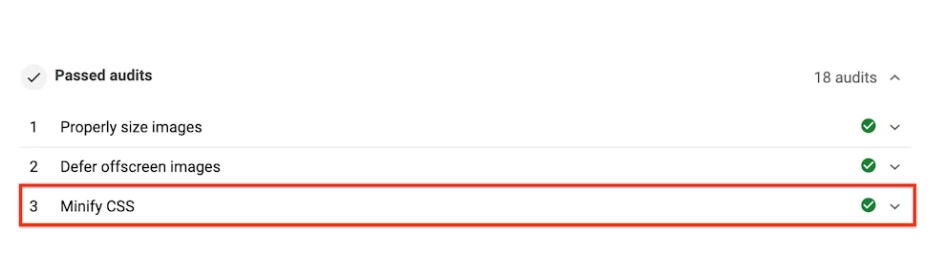
If web developers minify CSS files, you will see that recommendation “Minify CSS” moved to the “Passed Audits” section of the Lighthouse report.
Optimize JavaScript code
JavaScript code is a critical part of modern website design. On the other hand, using JavaScript code may slow down a website’s loading speed.
A web developer should analyze the Lighthouse report to fix JavaScript issues and speed up a website. There are most common issues and solutions.
First, the JavaScript code used on the website is a significant source of tasks. What is a task? A task is any discrete piece of work that the browser does and impacts the website’s performance. It can be rendering, parsing HTML and CSS, and running JavaScript code.
Some tasks can be too long (that take more than 50 milliseconds), and a web developer should break up such tasks. In other words, a web developer needs to divide a long task into smaller tasks that take less time using one of the task management strategies like the async attribute, manually defer code execution, yield only when necessary, and others. Choosing a strategy depends on the main website features you’d want to consider when managing tasks because it is about usability and how users interact with a website.
Minification JS code is another way to improve a website’s speed. To minify JS code a web developer should remove whitespace and any code that is not necessary to create a perfectly valid code file.
JS code compression is the process of modifying data using a specific algorithm. Most web developers use Gzip for server and client interactions, but Brotli is a newer compression algorithm that helps to achieve even better compression results than Gzip.
Also, we recommend using modern JavaScript to avoid reducing the website’s loading speed.
Modern JavaScript means syntax supported by all modern browsers such as Chrome, Edge, Firefox, and Safari. But using modern Java Script requires high-skilled web developers who have experience in advanced front-end and web app technologies.
Move a website to better hosting.
In some cases, the leading cause of slow website speed is hosting. A website owner must choose fast hosting to optimize the website’s performance.
Several solutions can be used to host a website.
Shared hosting is the most popular solution because it is cheap. But shared hosting means that you share the server’s CPU and RAM with many other sites that are also hosted on this server. If you need more RAM and CPU because your site attracts many visitors or use one of the modern frameworks, you need Virtual Private Servers (VPS) hosting or a dedicated server.
Virtual Private Servers (VPS) and dedicated servers are faster than shared hosting. VPS is fit needs of many business and e-commerce sites because it uses multiple servers for content distribution and provides your own part of the virtual server.
Using a dedicated server is the most expensive solution because you need to rent or buy a server and pay for the system administrator’s services.
Now alternative solutions are also available for website owners. You can use cloud solutions like Microsoft Azure, Google, or AWS. Cloud providers provide quality services that can scale on demand for your needs.
Choosing a hosting provider is not easy but worth the effort.
Conclusions
Currently, a website’s loading speed is a vital factor that search engines assess, affecting website traffic and, as a result, business revenue.
You can test your website speed using one of the tools to know if improvements are needed. 89 score and below means your site’s performance needs to be improved. Image optimization and minification of CSS and JS can speed up a website. But as you can see, it is not an easy task.
Also, hiring skilled web developers who can write quality, optimized code is important. Because it is an almost impossible job to optimize a website that was created by low-skilled web specialists. Re-developing the website from scratch becomes easier, faster, and cheaper in this case.
“Over time, I realized that speaking and understanding Chinese wasn’t just a ‘useful skill’—it is my superpower and key to belonging,” says Cheryl Mainland, Founder & CEO of Dragon Academy. Her fluency in Chinese has been a source of identity and has played a key role in her journey—from understanding her cultural heritage to excelling at Harvard in East Asia Studies and negotiating successful global business deals.
Recognizing the power of language to bridge cultures and connect with 1.3 billion native Chinese speakers, Cheryl is now committed to creating an engaging and interactive multi-media platform for children and adults worldwide to learn Chinese through Dragon Academy.
At its core, Dragon Academy is an epic tale of nine multicultural teens journeying through six mystical realms brimming with ancient legends, mythical beasts, and dragons – all united in a quest to bridge worlds. This story is told across multiple media formats and channels, including a book series, social media content, an AI animation series, and other cultural initiatives. Complementing their adventure is a highly gamified app that transforms Chinese language learning into an exciting, immersive, (and even addictive) experience.
A mother of three, serial entrepreneur, lifelong adventurer, and avid surfer, Cheryl has become an inspiration to many. She has been featured in top media outlets such as The Wall Street Journal, Financial Times, Vogue, Tatler, WWD, and numerous other prestigious publications.
Cheryl embodies the essence of a third-culture kid. Born in Taiwan, she is half-Chinese, half-American, and raised across Asia, she navigated the complexities of identity, language, and belonging from an early age.
Cheryl with her maternal and paternal grandmothers Taipei, Taiwan, 1983 (Image Source: Cheryl Mainland)
“Like many of us, I grew up straddling two worlds. The ultimate translator of languages, cultures, generations. I carry with me the collective memory of (boring) Saturday Chinese school, the struggle of keeping up with my Chinese lessons, and the challenge of celebrating my heritage while forging my own path,” Cheryl says. “After having kids, I witnessed their similar struggles – nothing has changed.” She recognized that the traditional methods of learning Chinese – endless hours of copying hanzi characters on square grid paper (田字格) – have experienced minimal change over the centuries, relying on rote memorization rather than engagement.
Not wanting her children to face the same language learning struggles she faced (and hundreds of thousands of other Chinese learners), Cheryl is embracing this as an opportunity to spark a cultural movement that breathes new life into the Chinese language and culture. Dragon Academy’s strategy ignites a passion for learning through an epic narrative delivered via a highly gamified app, an AI mini-series, a book series, social media content, and a future film adaptation. Each of the multimedia platform components captures the story-based enthusiasm, teaching Chinese through nine proprietary building block methods that make learning Chinese fun, engaging, and truly relevant.
Dragon Academy Universe: the foundation of a highly gamified Chinese language learning app, book series, cartoons, feature films, documentaries, merchandise, and console games. (Image Source: Cheryl Mainland)
Cheryl’s Entrepreneurial Journey: Empowering the Masses
Throughout Cheryl’s entrepreneurial ventures, a constant theme has been empowering communities by identifying unmet needs and transforming the “uncool” into “cool” through innovative solutions. From dressing corporate women in clothes that boosted their self-confidence in the boardroom (The Fold London), to inspiring tweens and teens “to wear their invisible crown” on all special occasions (PromGirl.com), to reimagining sun-protective fashion—proving that staying safe in the sun doesn’t mean sacrificing style (Mott50)—her work consistently uplifts and inspires.
Most recently, to celebrate the launch of Dragon Academy Book 1 during Lunar New Year 2025, Cheryl partnered with artist Archie Geotina to honor the 46 million-strong Chinese diaspora through Pearls, an art series. Chinese Pearls features three generations of female surfers from diverse Chinese heritage – Indonesian Chinese, Singaporean Chinese, mixed-Chinese families, adoptees, and expats – riding Bali’s iconic waves in modern QiPao, empowering the community and highlighting its resilience, heritage, and unity.
A Future for the Community
“As an Asian American entrepreneur, Asian American mom, and a lifelong advocate for bridging cultures, I resonate deeply with AHN’s mission to uplift and empower the global Asian diaspora,” Cheryl affirms.
She draws a parallel between Dragon Academy’s goal to reignite the next generation’s connection to their heritage and AHN’s commitment to rewriting narratives and celebrating Asian excellence. When asked about her future plans, Cheryl confidently states, “We are on an ambitious mission to increase the percentage of the world that speaks Chinese by 5% over the next five years.”
An estimated 5 million people started learning Japanese because of Manga, 15 million took up Korean because of K-pop, Dragon Academy is set to start a Chinese language movement. By juxtaposing storytelling and technology, Dragon Academy is approaching Chinese language learning from an “obsess, learn, master” order.
“Imagine a world where kids want to learn Chinese because they see it as their ultimate superpower and key to belonging. That’s the future we’re building,” exclaims Cheryl.
And the journey is just beginning. Dragon Academy Book 1 launched at the beginning of this year. The highly gamified learning app, immersive AI mini-series, and a host of exciting cultural initiatives are currently in development. The first round of external investment has commenced – seeking visionary, like-minded investors to join this transformative movement. Dragon Academy is poised to redefine the landscape of Chinese language learning and cultural exploration.
DRAGON ACADEMY “Traditional Scene.” The OG Dragon Keepers, ancestors of the 9 multicultural teenage protagonists of the Dragon Academy Universe. (Artist: Andrew Archer)
The path to success in content creation is never paved with roses, and no one understands this quite like Ami Desai. From her beginnings in broadcast journalism to becoming a well-known beauty and lifestyle influencer, Ami has shaped her career through authenticity, adaptability, and a strong dedication to representation.
As an Indian-American raised in Los Angeles, Ami grew up as a first-generation South Asian immigrant, a generation that deeply felt the need for greater South Asian representation in the media. After earning her degree from UC Berkeley and a master’s from Boston University, she built a solid media foundation through roles at CNN and Inside Edition. During this time behind the scenes, she discovered her passion for on-camera hosting, eventually landing her dream role as the host of the first digital show for Oprah.com. In 2011, Ami made a pivotal move by hosting a luxury travel show in India, which allowed her to reconnect with her roots and gain international exposure.
Simultaneously, Ami began building her own beauty business with her family. She went on to become one of the first South Asian content creators to collaborate with major brands like Toyota and Pampers on large campaigns, while also highlighting important Indian traditions and holidays such as Diwali. Recognizing the lack of representation for her ethnicity in the media and beauty industries, Ami founded her life’s mission, merging her experiences as a host, makeup artist, and mom to help other women advocate for themselves while balancing various roles. This gap in representation became her motivation to amplify underrepresented voices and promote diversity.
In 2016, Ami took a leap of faith, leaving traditional media behind to forge her own path in the influencer space. Despite pitching herself as a contributor or expert to various outlets, she faced rejection, which drove her to create her own content on social media platforms. Through this experience, she realized that content creation involved more than just posting visually appealing images—it required strategic planning, engagement tracking, and brand pitching. Even as the industry pushed her to narrow her niche, Ami confidently embraced her multifaceted identity, sharing content that reflected her life as a mother, beauty expert, and entrepreneur. This authenticity deeply resonated with her audience, ultimately helping her build a loyal fanbase connecting creators and audiences.
In the latest episode of the Creators Podcast, presented by Asian Hustle Network in collaboration with Meta Prosper, Ami shares a story of resilience, adaptability, and a deep dedication to her community. Whether you’re an aspiring content creator, a beauty lover, or someone who enjoys learning about authentic journeys, this episode is filled with valuable insights and inspiration.